

Last updated: 2nd September 2026.
Your participation rates are strong. Employees are sharing content regularly. Reach is up. By every measure you track day-to-day, the program is a success.
So why does it feel like you’re running on instinct?
Here’s a question worth sitting with: if your employee advocacy program were put in front of your CFO tomorrow, could you answer “what has this delivered for the business?”
If the honest answer is no, you’re not alone. And the program being active isn’t the problem. The problem is that activity has become the goal.
When we polled 100+ CMOs on exactly this, 71% told us they aren’t measuring the impact of their employee advocacy program at all, and fewer than 1 in 20 are connecting it to pipeline or revenue.
The success trap
There’s a pattern that emerges in many mature employee advocacy programs.
The early pressure to prove the concept fades once the program gains momentum.
Participation becomes self-sustaining: content gets shared regularly, and engagement numbers look good. Leadership stops asking hard questions because nothing appears to be broken.
So the focus shifts. Instead of working toward specific business outcomes, the goal becomes keeping the program running. Keeping people active and the content calendar full.
It feels like progress and has the shape of success. But without a clear line to business results, what you actually have is a program that’s platform data-rich, but insight-poor.
This is the success trap: the program is doing well enough that no one questions it, but not clearly enough tied to business outcomes that anyone could defend it if they did.
Why this happens
The success trap isn’t a failure of intent. Most program managers care deeply about demonstrating value. The problem is structural.
Business outcome data like conversions, leads, and pipeline influence typically live in tools owned by other teams.
GA4 is managed by the web team and CRM data sits with sales. Getting a custom report built requires time, stakeholder buy-in, and often a queue.
So program managers default to what they can access: the analytics inside their employee advocacy platform.
Shares, reach, impressions, engagement, earned media value, clicks, user adoption.
These are real and meaningful metrics. But they measure the program’s output, not what that output delivers to the business.
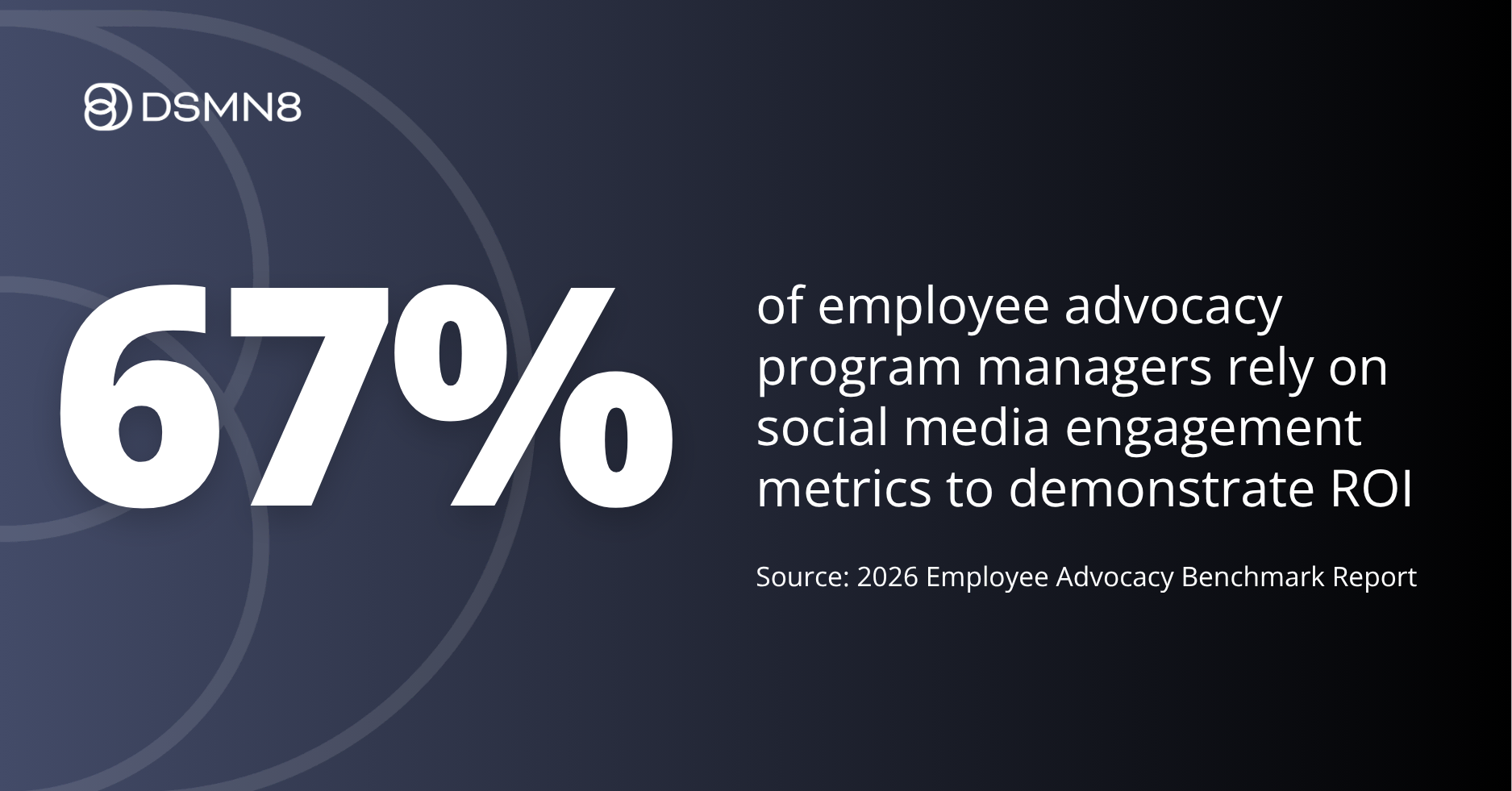
According to the 2026 Employee Advocacy Benchmark Report, 22% of program managers aren’t currently measuring ROI at all, and of those who are, 67% rely primarily on social media engagement metrics.
The result is a measurement gap.
Your program looks healthy by its own standards. But those standards were never connected to the questions the business actually cares about.
What CFO-ready measurement looks like
When a finance leader looks at a program, they’re asking one thing: what is this worth relative to what we’re spending?
Answering that requires metrics that translate into commercial language.
There are four layers that matter:
1: Reach and earned media value
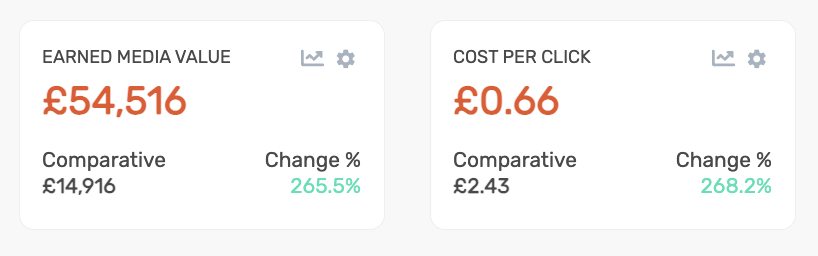
DSMN8 tracks the estimated value of the organic reach your program generates, calculated against equivalent paid media costs.
For programs with strong participation, this figure is often striking on its own.
It frames employee advocacy not as a soft brand activity but as a media channel with a quantifiable cost equivalent.
This layer is the easiest to surface because it lives within your advocacy platform.
2: Website traffic and engagement quality.
Every link shared through DSMN8 carries UTM parameters automatically, which means every click back to your website is attributable to the program.
While you can see clicks within DSMN8’s analytics and create custom dashboards filtered to specific teams or groups, Google Analytics will help add additional context.
In GA4, you can understand the actions a user has taken, such as form submissions, downloads, or newsletter sign-ups. You’ll also be able to compare directly with other marketing channels.
If your advocacy traffic consistently shows higher engagement rates than paid social, that’s a CFO-relevant data point!
This is also where the commercial case becomes clearer.
If you don’t have access to GA4, the conversation to have is with your web or marketing ops team: you need one report, built once.

3: Free Data Studio Template: The Bridge for Program Managers without GA4
If your organization won’t allow access to GA4, you can use Data Studio (formerly Looker Studio) to create dashboard.
This does require someone with GA4 access to set up, but once it’s done, you can see employee advocacy data without being given full access to the company’s website analytics.
This can be a helpful middle ground if your organization is wary about giving too many folks access to GA4!
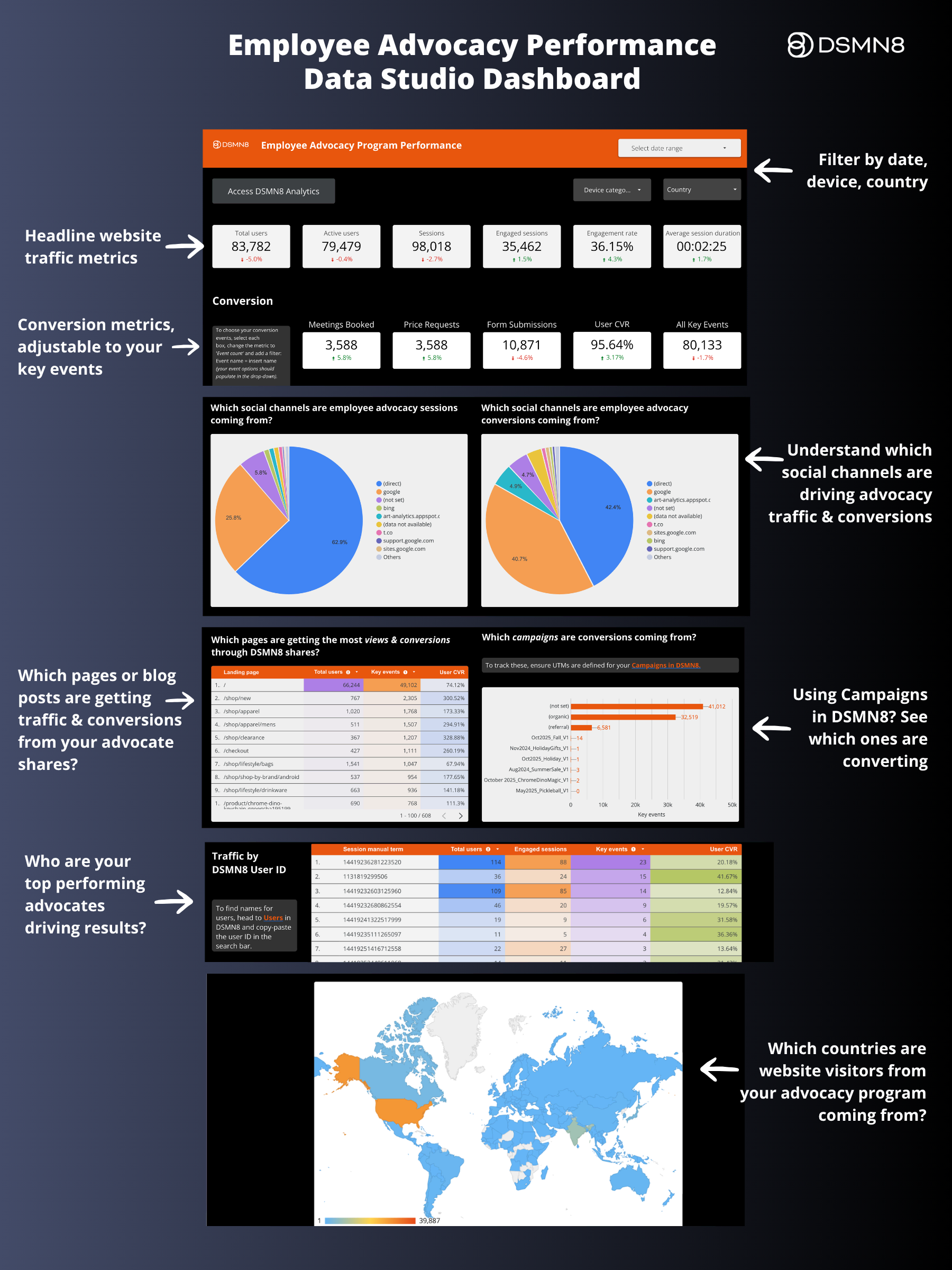
It includes:
- A program overview with headline traffic and conversion metrics (customizable to your own key events).
- Which social channels are driving traffic and conversions from your advocates’ shares.
- A granular breakdown of which pages/blog posts are receiving advocacy traffic, and which campaigns are performing.
- Which DSMN8 users are your top performers.
- A map showing which countries your advocacy traffic is coming from.
All of the above can be filtered by date, country, and device.
We’ve included a setup guide in the template; make sure to read that first.
This should take someone with GA4 admin access less than 20 minutes to set up for you.
Once copied and connected, this dashboard can be shared as a view-only link with stakeholders, such as your manager or exec sponsor.
4. Pipeline attribution via your CRM.
For teams using CRMs like HubSpot, there’s a fourth layer that moves the conversation from “our program drove traffic and conversions” to “our program influenced pipeline.”
When a prospect submits a form after clicking an employee-shared link, HubSpot can capture the UTM parameters on that contact record.
This means you can build lists and run reports on contacts and deals where employee advocacy was the original source.
It does require some initial setup, but it’ll take just a minute to do.
Setting up UTM capture in HubSpot
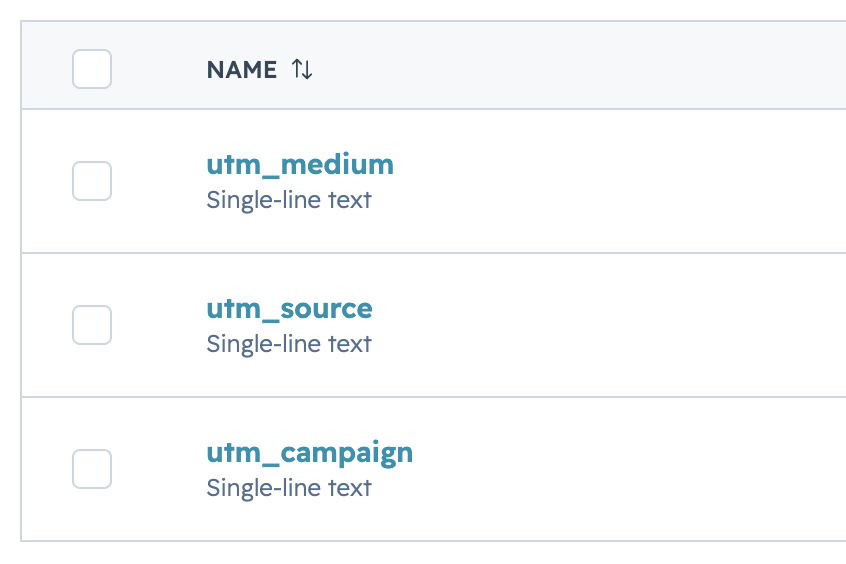
Step 1: Create your UTM contact properties in HubSpot
Go to Settings > Data Management > Properties, select Contact properties, and search for “utm” to check if any already exist in your account. If they don’t, which is common, you’ll need to create them manually.
Click ‘Create property,’ then ‘edit more options’, and set up the following for each UTM:
- Property label: utm_source, utm_medium, utm_campaign, or utm_term (optional if you wish to track DSMN8 user IDs).
- Object type: Contact
- Group: Contact information (or create a new group called “UTM Parameters” to keep them organized)
- Field type: Single-line text
- Rules: Ensure that ‘show this property in forms’ is checked (it should be automatically).
At a minimum, you need utm_medium for DSMN8 attribution.
Adding utm_source and utm_campaign gives you a fuller picture of which platform and which campaign drove each contact.
💡 When you create campaigns in the DSMN8 platform, remember to set a utm_campaign within the campaign settings to ensure this data is pulled into HubSpot and GA4.

Step 2: Add hidden fields to your forms.
In HubSpot, go to Marketing > Forms and open the form you want to update. If you’re in B2B, your demo request form and your highest-converting resources are the best places to start.
In the form editor, you’ll now add a hidden field for each UTM property you created in Step 1.
- Under existing properties, search for the UTMs you just set up, e.g., utm_medium.
- Drag these to the bottom of your form.
- Click on each and check ‘Make this field hidden’.
Step 3: Build your filtered contact list
Once UTM data is flowing into contact records, you can build a live list of every contact generated through your employee advocacy program.
Go to Contacts > Segments (Lists) > Create Segment > Add a filter:
Contact property > UTM Medium > contains > DSMN8 (or employee_advocacy if that is your UTM medium).
Save the list as an active segment. It will update automatically as new contacts come in, giving you a running total of advocacy-sourced contacts over time.
You can also add a view to your overall Contacts dashboard in HubSpot, which is helpful to do.
Go to Contacts, select Add view, then Create new view. Call this ‘Employee Advocacy Contacts’ or something similar and save it.
You’ll then need to apply a filter to this view by clicking ‘Advanced filters’.
Contact property > UTM Medium > contains > DSMN8 (or employee_advocacy if that is your UTM medium), then save the view.
Next, you can edit the columns you wish to see, such as Lifecycle Stage or MQL status. Make sure to add ‘Contact -> Deals’ to see if those contacts have associated deals. It’s also helpful to add UTM Campaign to see which content campaigns are working for you.
Step 4: Run a deal report
To see the deals associated with your advocacy-sourced contacts, go to Reports > Create report > Custom report. Select Contacts as your primary data source, then enable Deals as an additional source.
In the report builder, choose the visualization format you’d like, then drag the properties you want to see into the report. The most useful starting point is:
From Contacts: contact name, create date, lifecycle stage, UTM source, UTM campaign.
From Deals: deal name, deal stage, amount, close date.
The fields are fully customizable: add or remove whatever is most relevant to how your team tracks the pipeline.
Once you’ve added your fields, click the Filters tab and add the following:
Contacts > UTM Medium > contains > DSMN8 (or employee_advocacy if that is your UTM medium).
You can also filter by deals only to avoid contacts being surfaced here that do not have associated deals.
Save the report and add it to a dashboard for easy access. This gives you a live view of the pipeline your advocacy program has influenced, by contact, deal value, stage, and campaign, if you are using UTM campaign tracking in DSMN8.
While the broader picture of all advocacy-driven traffic still lives in GA4, this is a great way to demonstrate pipeline influence to a CFO and the most commercial data point available to prove ROI.
Moving from running the program to validating it
Platform metrics and business metrics are both useful. The mistake is treating them as interchangeable.
- Shares, impressions, and engagement tell you the program is being used and content is resonating.
- UTM-attributed sessions tell you it’s driving traffic.
- Conversion data tells you that traffic is doing something valuable.
- CRM attribution tells you what that value looks like in pipeline terms.
Together, these layers above build a commercial case that most advocacy programs never assemble. This isn’t because the data doesn’t exist, but simply because no one has connected it.
The programs that survive budget scrutiny are the ones where the program manager can walk into a conversation with leadership and say:
“In the last 12 months, our employee advocacy program generated X in earned media value, drove Y sessions to our website, contributed to Z demo requests, and influenced £N in pipeline.”
That’s the language that turns a “nice to have” into a business asset.
The shift doesn’t require rebuilding your measurement approach from scratch. For most programs, it means adding one or two layers to what you already track.
Start with what DSMN8 gives you directly: earned media value, shares, clicks, reach, engagement. These metrics are available now, with no additional setup.
Then identify the one business outcome you most want to demonstrate.
For most programs, that’s website conversions: demo requests, content downloads, form completions.
Talk to whoever owns GA4 and ask for a report filtered to your UTM medium.
If this isn’t allowed by your organization, the free Data Studio template is a 20-minute setup for anyone with GA4 admin access, and can then be used by program managers who don’t have full GA4 access themselves.
If you want to go further and surface pipeline attribution in HubSpot, ask whoever manages your CRM and website forms to follow the steps above.
Finally, set a target based on your baseline metrics.
A specific number for the next quarter or year, like a traffic increase percentage, an earned media value figure, a number of demo requests, or contacts attributed to the program.
Having a target does two things: it gives you something to report against, and it signals to leadership that the program has a strategic direction, not just a content calendar.
If you’re starting that process from scratch, our guide to aligning employee advocacy with your social media strategy covers how to build goals into the program architecture from the ground up.
Additional Resources
Ready to get started with the #1 employee advocacy platform?
Wondering how active your team already is, and how this compares with your competitors?
Get a free competitor analysis review.
More on tracking employee advocacy and proving ROI:
FAQ
How do you measure employee advocacy ROI?
Start with what your advocacy platform gives you directly: earned media value, share rates, and UTM-attributed clicks. Layer on GA4 conversion data: demo requests, form fills, content downloads. For teams using HubSpot, configuring hidden UTM fields on your forms adds a fourth layer: pipeline attribution showing which contacts and deals originated from employee-shared links.
What metrics should an employee advocacy program report on?
The most defensible metrics for business stakeholders are earned media value (reach expressed as a cost equivalent), website sessions and engagement rate from advocacy-attributed traffic, conversion events completed by advocacy-sourced visitors, and where CRM attribution is configured, pipeline influenced by the program. Participation rate and content shares are useful operationally but don’t translate well into CFO-level conversations on their own.
What if I don't have access to GA4?
The UTM data exists in GA4 whether or not you can access it directly. The quickest route is to ask your web or marketing ops team for a report, or to ask them to connect it to a Data Studio dashboard that any stakeholder can view without needing GA4 access themselves.
What is the most common way employee advocacy programs measure ROI?
According to the Employee Advocacy Benchmark Report 2026, 67% of programs rely primarily on social media engagement metrics to measure ROI. Just 43% track website traffic and conversions, and 22% aren’t currently measuring ROI at all. The gap between what’s being tracked and what finance teams actually want to see is where programs lose buy-in from leadership. Thankfully, the data is there; it just needs to be translated into outcomes.

Emily Neal
Emily is SEO Lead at DSMN8. She focuses on organic growth strategy across search and AI search and co-authors DSMN8's original research, including the Employee Advocacy Benchmark Report and edited CEO Bradley Keenan's book. Her background spans SEO strategy, technical web, long-form content, digital PR, and marketing automation.