
What's on this page:
- Why Should You Optimize Your LinkedIn Profile?
- How To Optimize Your LinkedIn Profile: Best Practices.
- 6 Ways to Make Your LinkedIn Profile Stand Out.
- Good LinkedIn Profile Examples.
- Your LinkedIn Profile is Now an AI Search Signal.
- LinkedIn Profile Optimization Checklist.
- 7 Ways to Grow on LinkedIn.
- Additional Resources.
Last updated: 5th June 2026
LinkedIn launched in 2003 as a place to share your resume and apply for jobs.
You can still do that, of course, but these days LinkedIn is a full-on social network for professionals, with over 1.2 billion members and counting.
Now that LinkedIn is so popular, you might be wondering how to stand out from the crowd. It’s more important than ever to build your personal brand.
But before you start sharing content, you’ll want to optimize your LinkedIn profile for maximum exposure. We’ve put together a full guide based on learnings from managing hundreds of employee advocacy programs, complete with a PDF checklist and some great examples to inspire you.
Why Should You Optimize Your LinkedIn Profile?
LinkedIn is the new resume.
It’s the foundation for personal branding. During a job search, employers will definitely check out your LinkedIn before inviting you to interview.
But even if you’re not currently looking for a job, your LinkedIn profile should still be up to date.
An optimized LinkedIn profile enables recruiters to find you, can lead to incredible opportunities like speaking at events, and helps you become known as a thought leader in your industry.
If you work in sales or the B2B sector, you already know how important networking is. Building your personal brand on LinkedIn is the key to social selling success and can directly lead to career progression.
Here’s why completing your LinkedIn profile matters, according to LinkedIn themselves:
- LinkedIn members who have skills listed receive an average of 13x more profile views.
- LinkedIn profiles with photos are 14x more likely to be viewed.
- LinkedIn profiles with complete information are 40x more likely to receive opportunities.
How To Optimize Your LinkedIn Profile: Best Practices
Let’s start with the basics: setting up your LinkedIn profile. Here are the best practices, recommended by LinkedIn itself. You’ll also find our top tips to make you stand out on LinkedIn!
1. Profile Picture
“Does my LinkedIn profile picture really matter? Surely my experience is more important?”
Well yes. BUT…
Humans are visual creatures!
We want to see who we’re talking to online. Do you come across as friendly and approachable? 🤔
An eye-catching pic makes you stand out from the crowd.
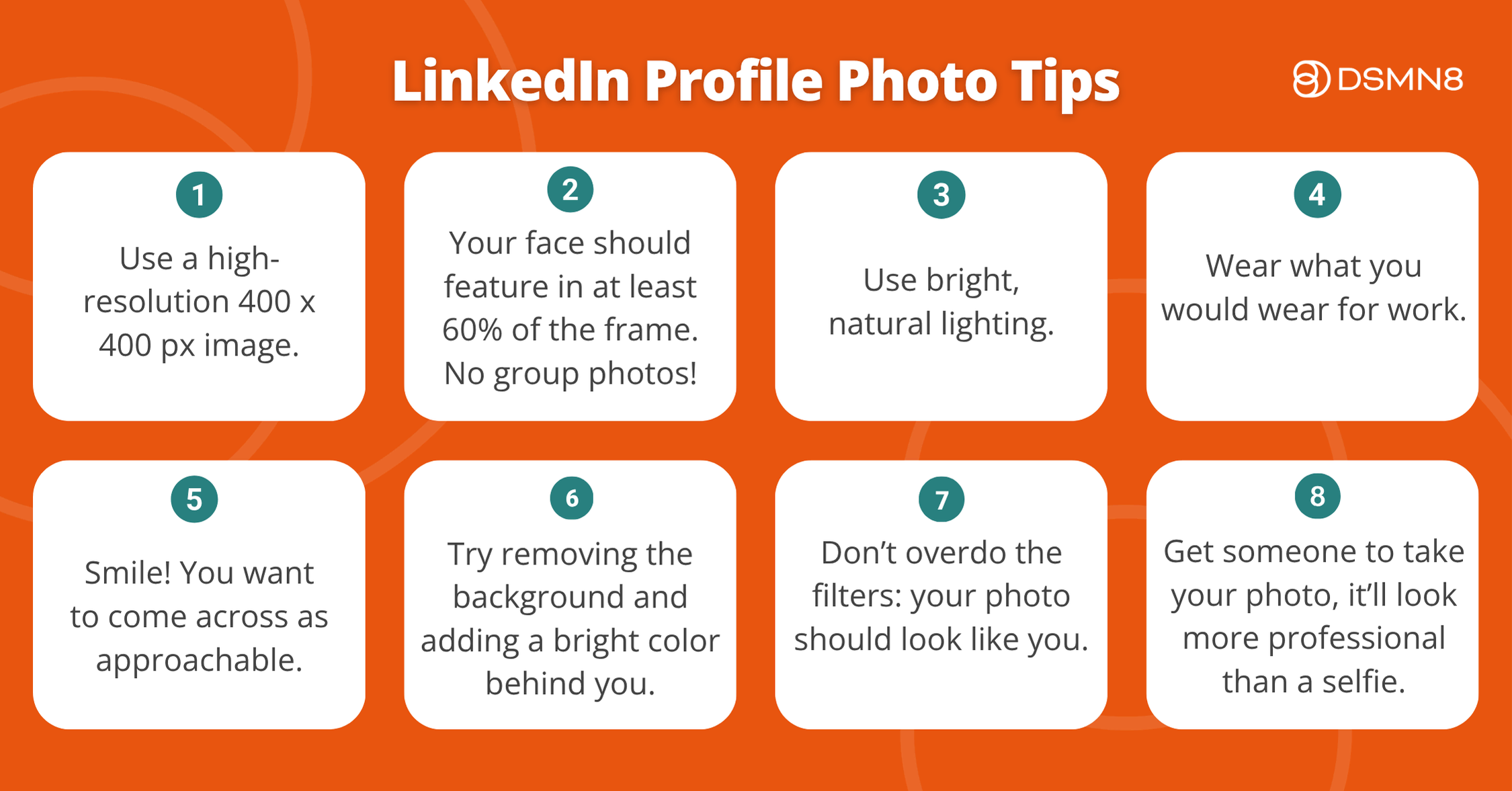
Tips for Leveling Up Your Profile Pic
- High-resolution images of 400 x 400 px are ideal for LinkedIn.
- Your face should cover at least 60% of the image. Full-body shots with distracting backgrounds aren’t great.
- Use natural lighting. You don’t want to be washed out and pale under fluorescent lights. Likewise, you don’t want to be in the shadow.
- Be professional (that doesn’t mean you need to look serious – please smile!). Wear what you would wear to work.
- Definitely no group shots. We want to see you alone!
- Try adding a bright color behind your picture. Use this LinkedIn Profile Picture tool to remove the background.
- Make sure it looks like you. Don’t overdo the filters, this isn’t Instagram!
- A professional headshot is ideal, but in the meantime, get someone at the office to take a photo of you, or use a tripod. It’ll look a million times better than a selfie.
Top tip: make sure your profile picture is visible to everyone on LinkedIn. This will help people you know find you, but also makes you seem more approachable.
2. Background Image
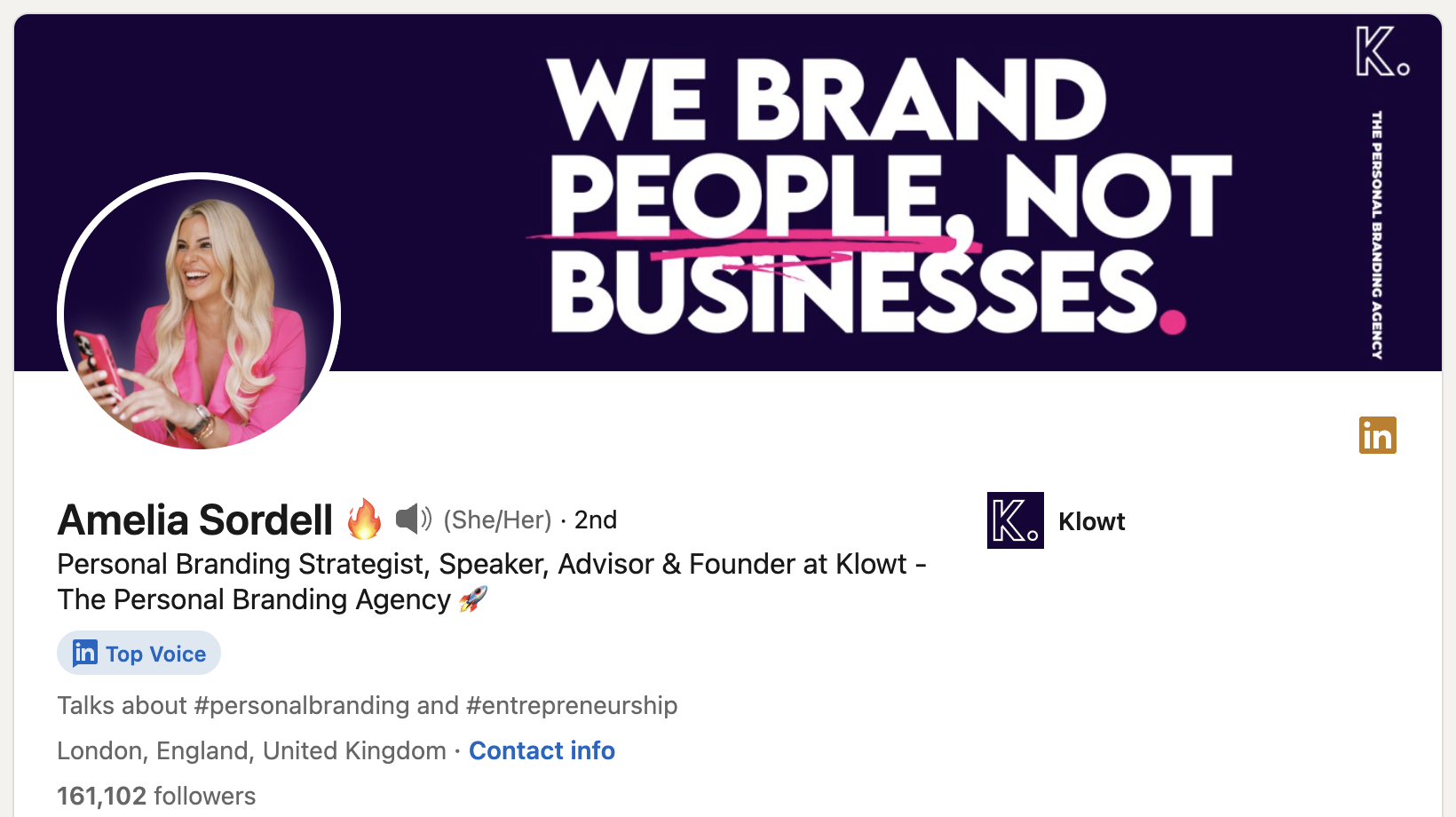
Your LinkedIn background image is a significant visual element – it’s the first thing someone sees when they click on your profile.
It’s important to grab their attention and show what you’re all about.
LinkedIn background photos should be 1584 x 396 px, or an aspect ratio of 4:1.
Anyone can make a great LinkedIn cover image with Canva. Give it a go!
Need Some Ideas?
Top Tip: Match the colors in your profile picture and your background pic. It’ll look really put-together.
3. Headline
Isn’t my headline just supposed to be my job title?
Well, not necessarily!
LinkedIn allows for 220 characters in headlines.
This gives you a little bit of space to let people know what you do and why they should be interested in you.
Make it fun! If you want to become a LinkedIn influencer, make your value proposition clear. Why should they follow you?
Here’s a great example from Lewis at DSMN8:
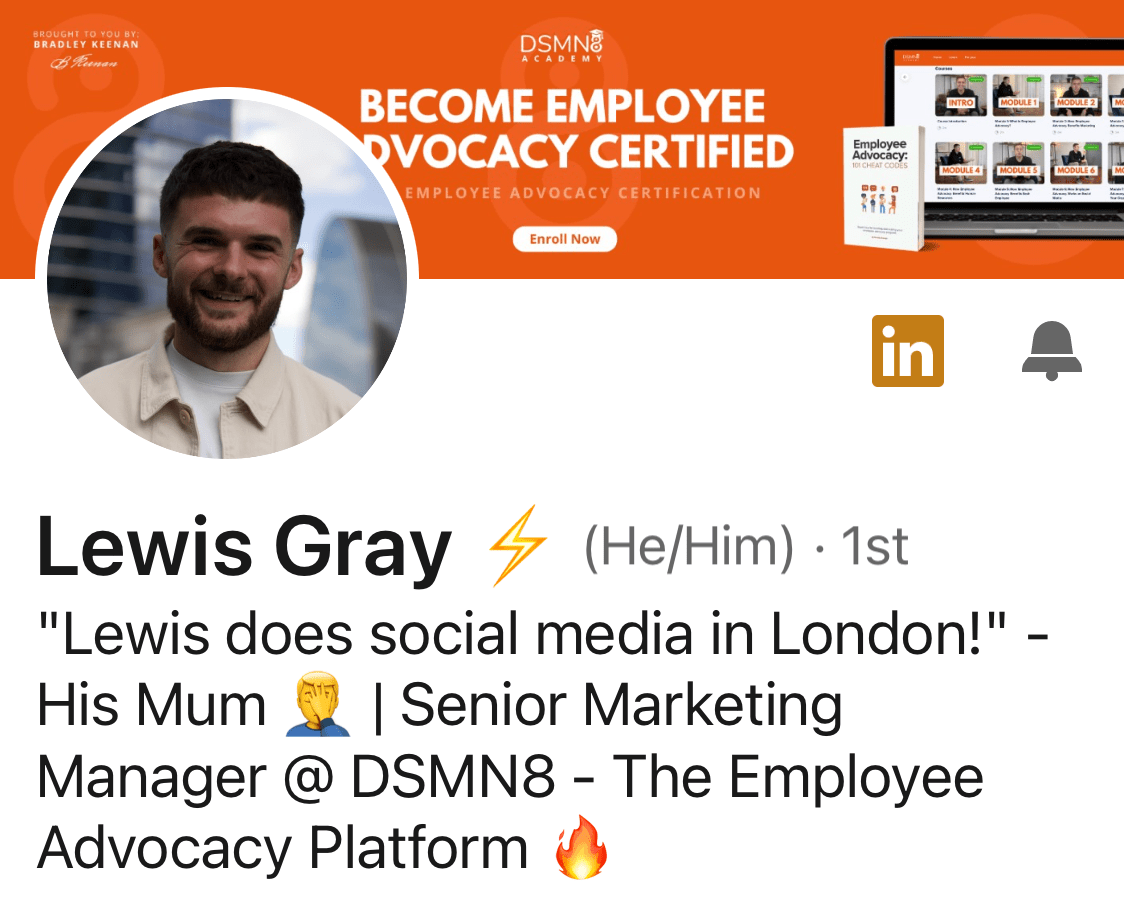
“Lewis does social media in London!” – His Mum 🤦♂️ | Senior Marketing Manager @ DSMN8 – The Employee Advocacy Platform 🔥”
It’s funny, includes emojis for visual interest, and makes it clear what his job role is and what DSMN8 does.
Make sure to add relevant keywords to your headline; it’s great for SEO and helps increase your LinkedIn visibility.
Here’s a helpful headline formula to use:
[Job Title] | Helping [Target Audience] Achieve [Benefit] through [Skill/Service]
4. Summary / About Section
Your LinkedIn Summary, or About Section, is all about you.
This can be a tough part to get right!
LinkedIn describes the summary as your ‘most personal piece of content marketing’, which is totally true.
The best way to approach it is with storytelling.
Don’t just list your skills and work experience, as they are already visible elsewhere on your profile.
You’ve got 2,600 characters to play with in your LinkedIn summary, so use them!
Talk about your career journey, picking out key moments that led you to where you are today.
Think of it like an author’s blurb – have you won any awards? Mention them. Worked on a really cool project? Talk about it.
Got a big goal in mind? Why not write about it? Where do you see yourself in 5 or 10 years?
Feel free to add some extracurricular stuff too. It’s relatable and helps people get to know you better. Plus, it can be a conversation starter and help you make connections. Bill Gates describes himself as a ‘voracious reader’ in his summary.
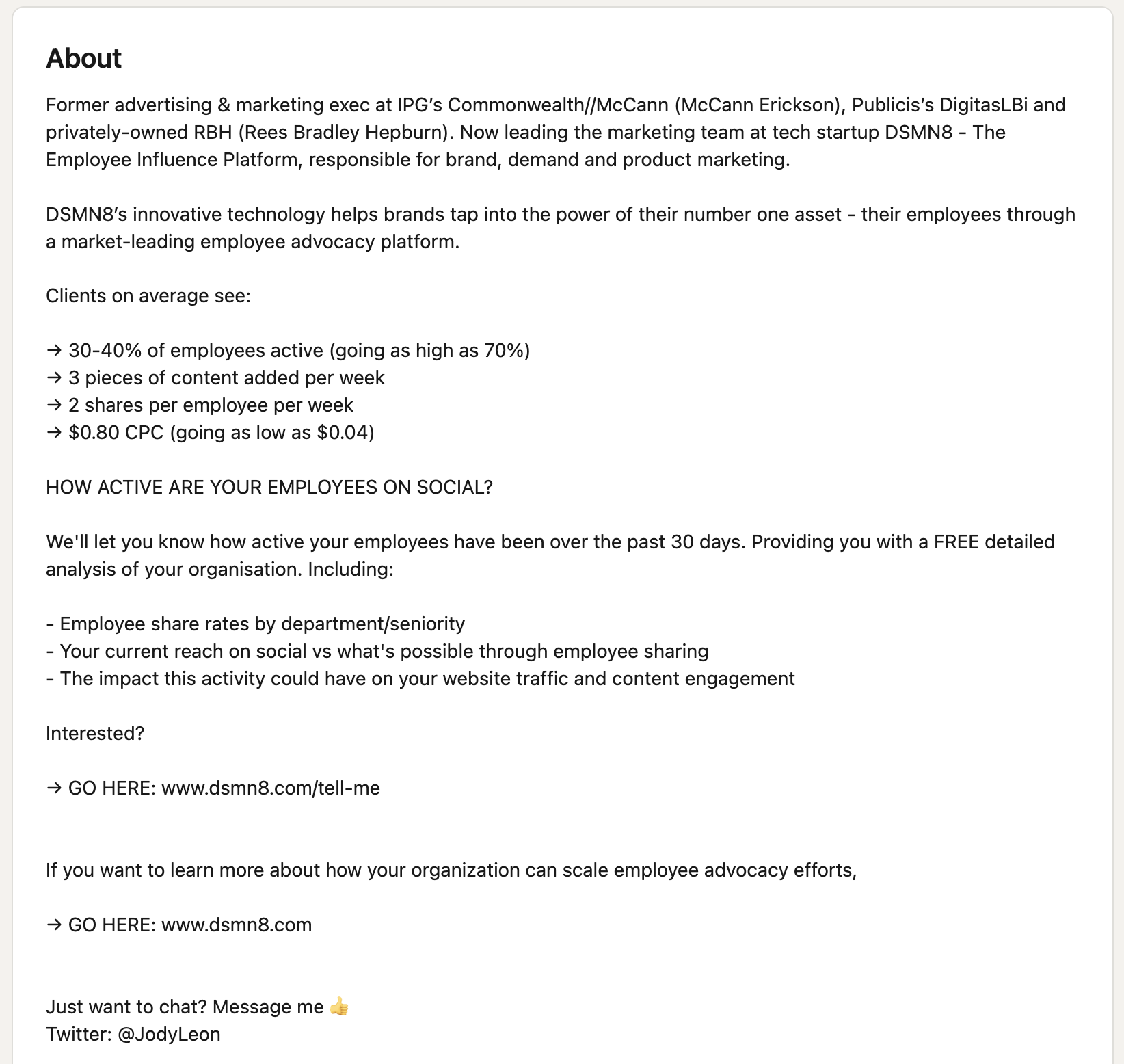
Here’s a good example from Jody, our VP of marketing:
5. Your Skills
LinkedIn’s skills section allows you to highlight your strengths.
You can add up to 50 skills on LinkedIn, but we recommend adding far fewer. No offense, but no one is an expert at everything 🤭
Besides, surely it’s better to focus on what you’re truly best at.
Oh, and make it relevant to your job!
LinkedIn Skills are categorized by three areas of expertise:
- Industry Knowledge
- Tools & Technologies
- Interpersonal Skills
Be sure to add a variety of skills across all three areas!
Top Tip: You can reorder your LinkedIn skills. This way, you can emphasize your most important skills. Click the ‘more’ icon at the top right of your skills section, then click reorder from the dropdown menu. Sort them however you like.
It’s worth reviewing your skills section occasionally to add new ones you’ve developed and remove any that are no longer relevant.
Did you know you can take skills assessments on LinkedIn? Try it out; if you pass, it gets displayed under your skill. This helps prove your expertise!
You can also add any licenses and certifications you hold, and link these to specific skills, as shown below.
The same applies to further education, whether that means completing professional training, a graduate education degree, or another program related to your career.

6. Endorsements
This is where your connections come in.
People you know or have worked with can ‘endorse’ your LinkedIn skills, adding a bit of social proof.
You can always ask your colleagues to endorse specific skills, and they can endorse you in return.
7. Work Experience
It might be tempting to add every single job you’ve ever had to your LinkedIn. If you’re early in your career path, that makes total sense.
But if you’re established in, say, marketing, do you really need that temporary summer camp job from 10 years ago on your profile?
Think strategically: a professional profile is valuable real estate. Highlight the best bits!
Add some details about each job: what did you do? Did you lead any projects? What skills did you learn?
Focus on impact over description. “Increased pipeline by 40% through LinkedIn outreach” is more compelling than a list of responsibilities. Where you can, quantify it.
8. Recommendations
LinkedIn recommendations are similar to endorsements, but a bit more personal and detailed.
Think of recommendations as testimonials about you, or a public reference.
These are especially important for freelancers and consultants. Ideally, you’ll have several recommendations from previous clients on your LinkedIn profile.
If not, consider reaching out to someone you’ve worked for and asking them to write a few sentences for you. The worst they can do is say no!
Don’t forget to write recommendations for others, too, if they were great colleagues, mentors, or employees. This benefits you as well as them, because you’ll show up on their LinkedIn profiles!
9. Check Your Settings
Visibility
LinkedIn removed the Creator Mode toggle in early 2024. If you were previously using it, don’t panic: the core benefits are still available.
Follower mode (which lets people follow you without connecting) is now the default for accounts with an established following. Features like LinkedIn Live, newsletters, and content analytics remain accessible via your profile settings and LinkedIn Pages tools.
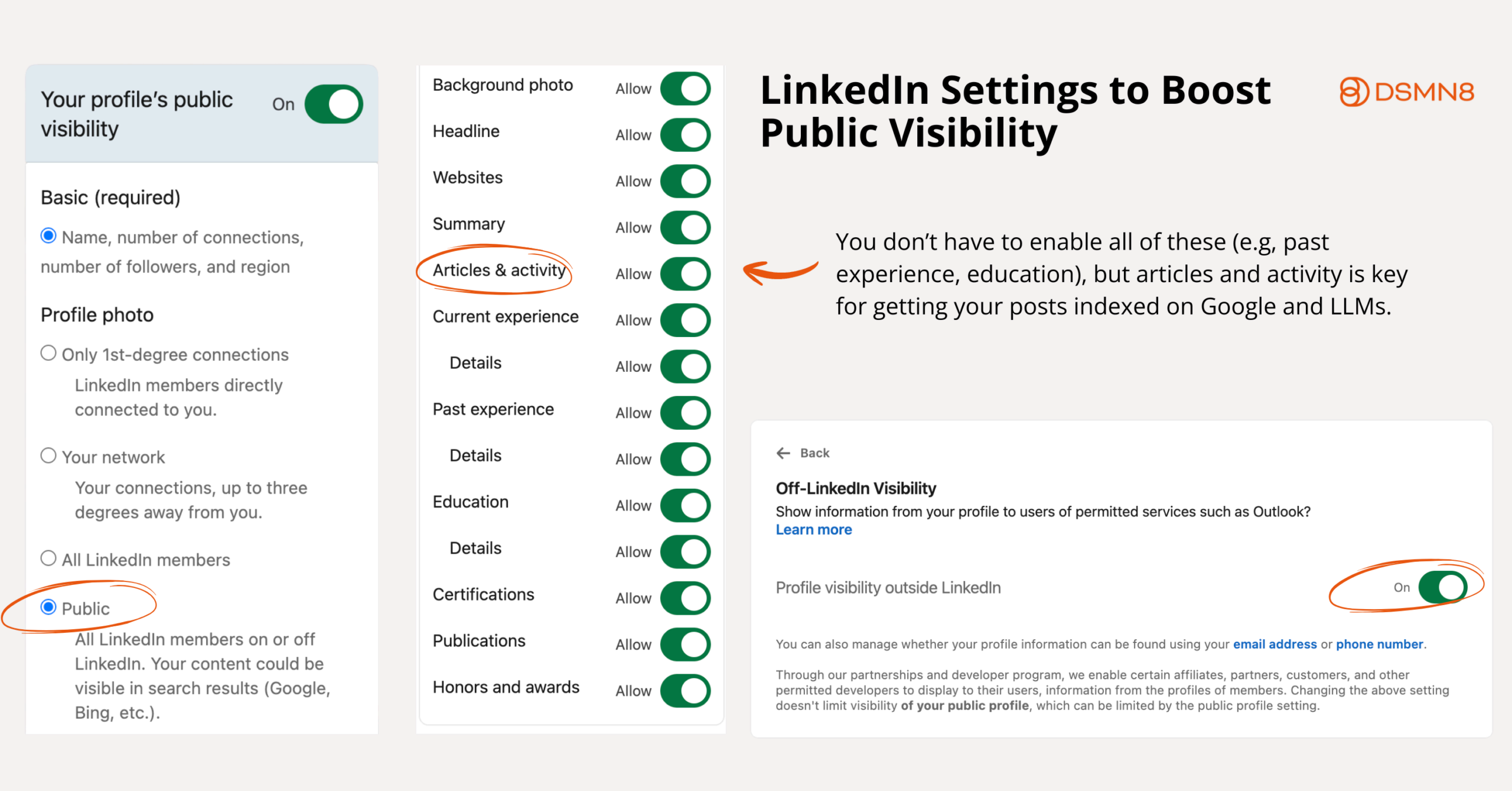
To maximize your opportunity to be seen on and off the platform, make sure to toggle on the following visibility settings:
Profile URL
You know the generic LinkedIn URLs? Full of numbers? Ew.
Don’t worry, you can change your profile link.
Go to your profile, then click ‘Edit public profile & URL’ on the right-hand side. This will take you to your Public profile settings page. Finally, click ‘edit’ under ‘edit your custom URL’.
LinkedIn Profile URL Rules:
- Custom URLs can be 3-100 characters long.
- No spaces, symbols, or special characters.
- You can change your URL up to 5 times in 6 months.
LinkedIn recommend using a variation of your name and/or business name for your public profile link.
If your name is John Smith, you might need to get a little creative with this one 😅
Record Name Pronunciation
Do people have trouble pronouncing your name?
LinkedIn has a snazzy little feature that allows you to record your name pronunciation! It’s such a good idea, considering how international the community is.
Open To Work
If you’re looking for a job on LinkedIn, turn on the ‘Open To Work’ feature.
You can do this by clicking ‘Open To’ at the top of your LinkedIn profile, then clicking ‘Finding a New Job’. After filling out the details about what kind of jobs you’re looking for, it’s all good to go!
When using #OpenToWork, you’ve got a few options:
- You can make it visible to all LinkedIn members. This will also add the #OpenToWork frame to your profile picture.
- Visible to Recruiters only. This is great for those who don’t want their current employer to know that they’re looking for work.
How To Make Your LinkedIn Profile Stand Out
Whether you want to get noticed by recruiters or you’re looking to become a LinkedIn influencer, you’ll want your profile to stand out.
Here are the best ways to do that! 👇
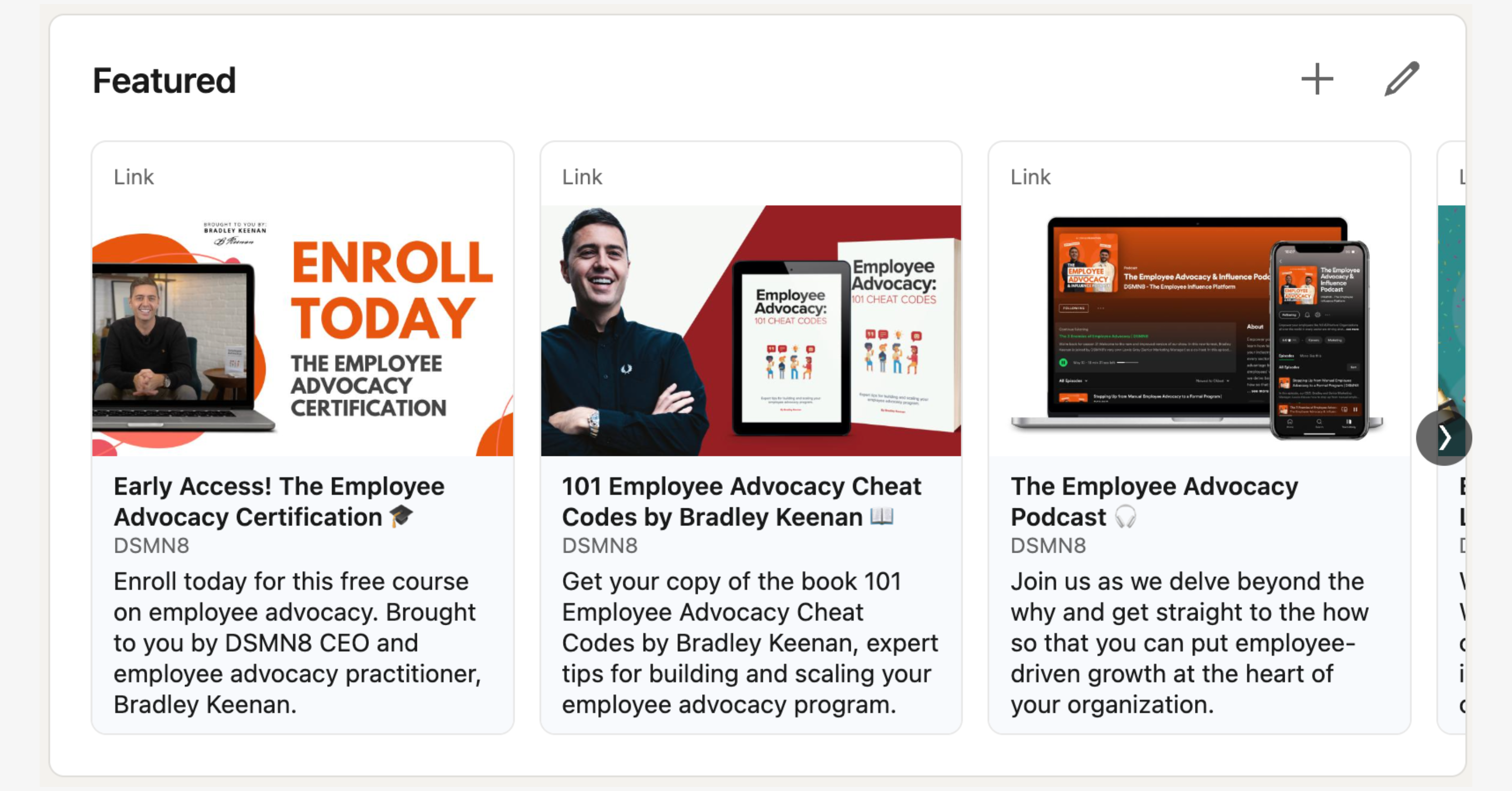
1. Use The Featured Section
We love the featured section here at DSMN8.
As marketers, we make a bunch of epic stuff!
Blog posts, podcasts, a book, a course… and we want it to be seen.
The featured section allows us to choose a few pieces of content to highlight at the top of our profiles.
Choose your 3 most important links to feature, and include an image or graphic to sit above them. You can add more than three featured links, but users will need to click the arrows to see them all.
You could feature an article you’ve written, a podcast episode where you’ve been a guest, or a portfolio… the possibilities are endless.
Here’s mine as an example:
2. Vary Your Media
While you might think that really long articles are the way to get seen on LinkedIn, it’s actually better if you switch up your content.
Add rich media to your posts and profile! Use photos, videos, or even try out LinkedIn Live if you’re feeling brave…
Variety is key for boosting your visibility.
3. Create Articles
LinkedIn’s native article feature lets you publish long-form content directly on the platform, and it’s worth using.
Articles live on your profile permanently, and appear in search results both on and off LinkedIn. They signal to your network (and the algorithm) that you’re a serious contributor in your space.
Unlike regular posts, articles give you space to go deep on a topic: a detailed how-to, an industry opinion piece, a case study from your own experience.
If you’re not sure where to start, think about the questions you get asked most often in your industry. Answer one of them properly. That’s your first article.
4. Try this Mini LinkedIn Content Plan:
Day 1: Share a post with less than 150 characters. Short and snappy, but with value.
Day 2: Find an article featuring recent industry news. Share your thoughts on the subject, using your own experience.
Day 3: Post a pic of your work-from-home office. Ask your connections a question and have a chat in the comments.

5. Use Lesser-Known LinkedIn Profile Features
So we’ve mentioned LinkedIn’s native articles feature, but did you know about Publications?
LinkedIn allows you to add a Publications section to your profile, where you can add links to articles, books, or academic papers you’ve written!
If you’re bilingual, you can also make a profile in a second language. Pretty cool, huh?
Taken any courses on LinkedIn Learning? Your achievements can be displayed on your LinkedIn page.
6. Think Twice About Buzzwords
Seems like everyone these days is a ‘guru’, right?
If you truly want to stand out on LinkedIn, avoid the buzzwords.
By all means, use them sometimes if necessary, but in moderation.
Remember: keywords are always better than buzzwords.
Great LinkedIn Profile Examples for Inspiration
Now you’ve got a good understanding about how to improve your LinkedIn profile, it’s time to share some of our favorites.
These folks are LinkedIn pros, so give them a follow for inspiration.
Justin Welsh
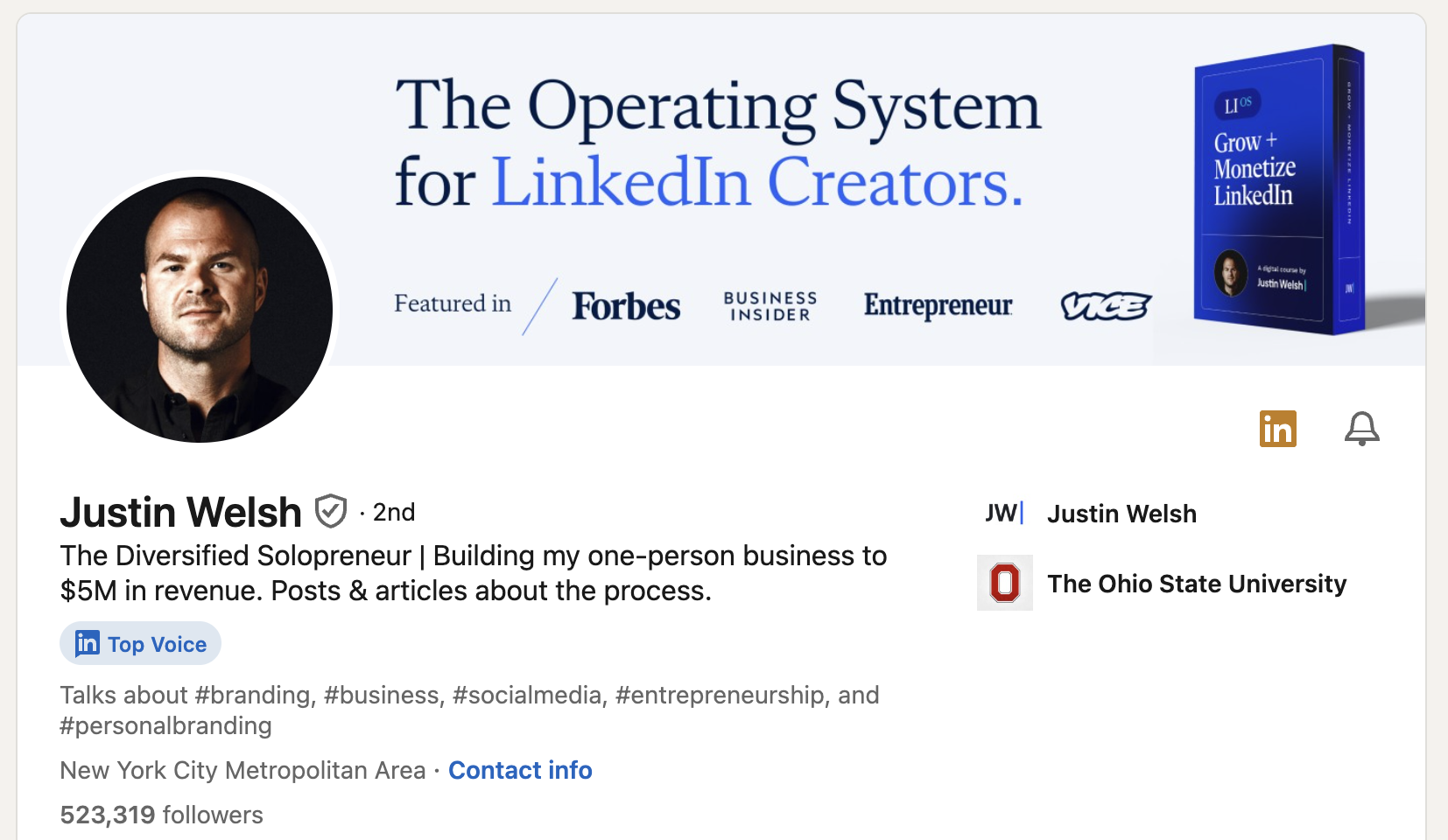
If you’re on LinkedIn, you’ve probably heard of Justin Welsh.
Justin is a social selling expert and pretty much the King of LinkedIn.
His personal branding is simple yet clear. The banner includes social proof by including places he’s been featured, and serves a purpose: advertising one of his courses.
Justin Welsh’s summary uses storytelling perfectly. He’s not afraid to talk about his failures and dreams, as well as results.
Lea Turner
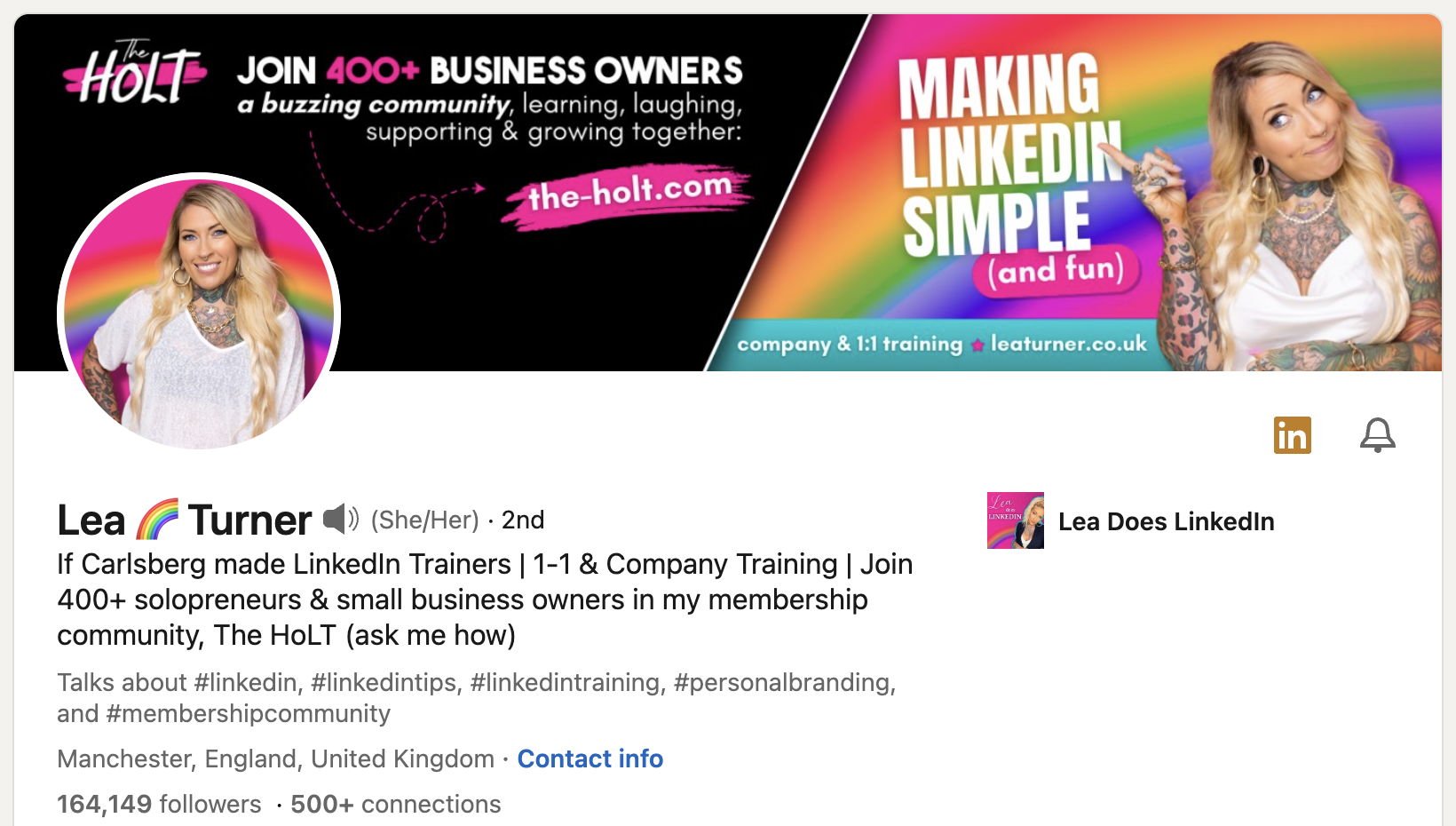
If Justin Welsh is the King of LinkedIn, then Lea Turner is the Queen.
I mean, just LOOK at her profile.
Lea’s rainbow brand identity is eye-catching and memorable.
Everything she posts stands out in the feed, and emphasizes her personality.
Jody from DSMN8!

Our VP of Marketing is a total LinkedIn pro.
Jody is so on-brand.
The DSMN8 orange? ✅
Optimized headline and summary? ✅
Featured section highlighting cool stuff? ✅
LinkedIn Profile Optimization Checklist
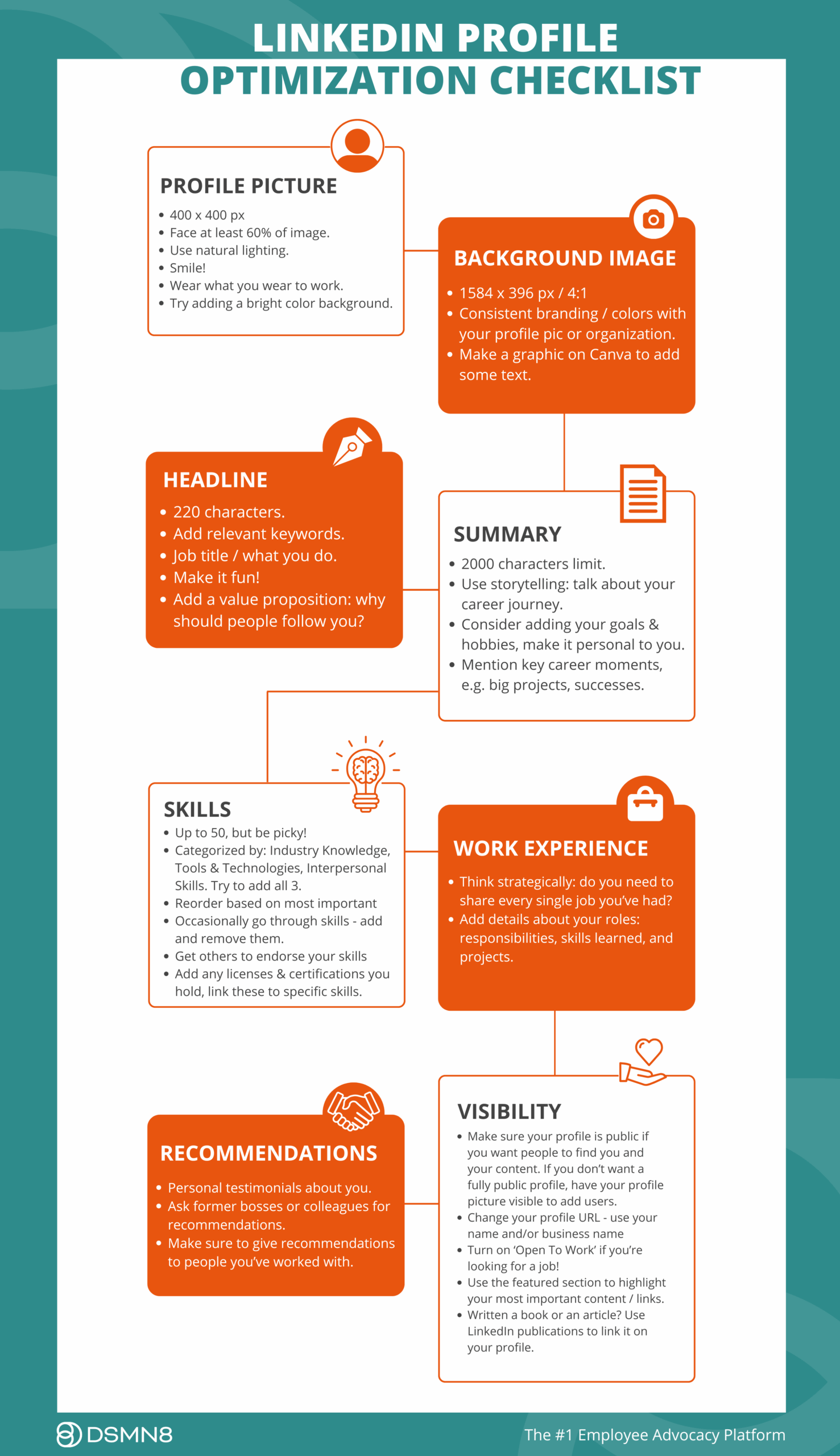
OK, that was a lot of info.
Don’t worry if you’re feeling a bit overwhelmed!
We’ve made a super simple LinkedIn Profile Checklist to help you keep track of your progress 💪
Save the image or download the LinkedIn Profile Optimization PDF.
I recommend checking out our podcast episode featuring Anna Bertoldini, an expert on personal branding, for some great insights on growing your LinkedIn presence:
Your LinkedIn Profile is Now an AI Search Signal
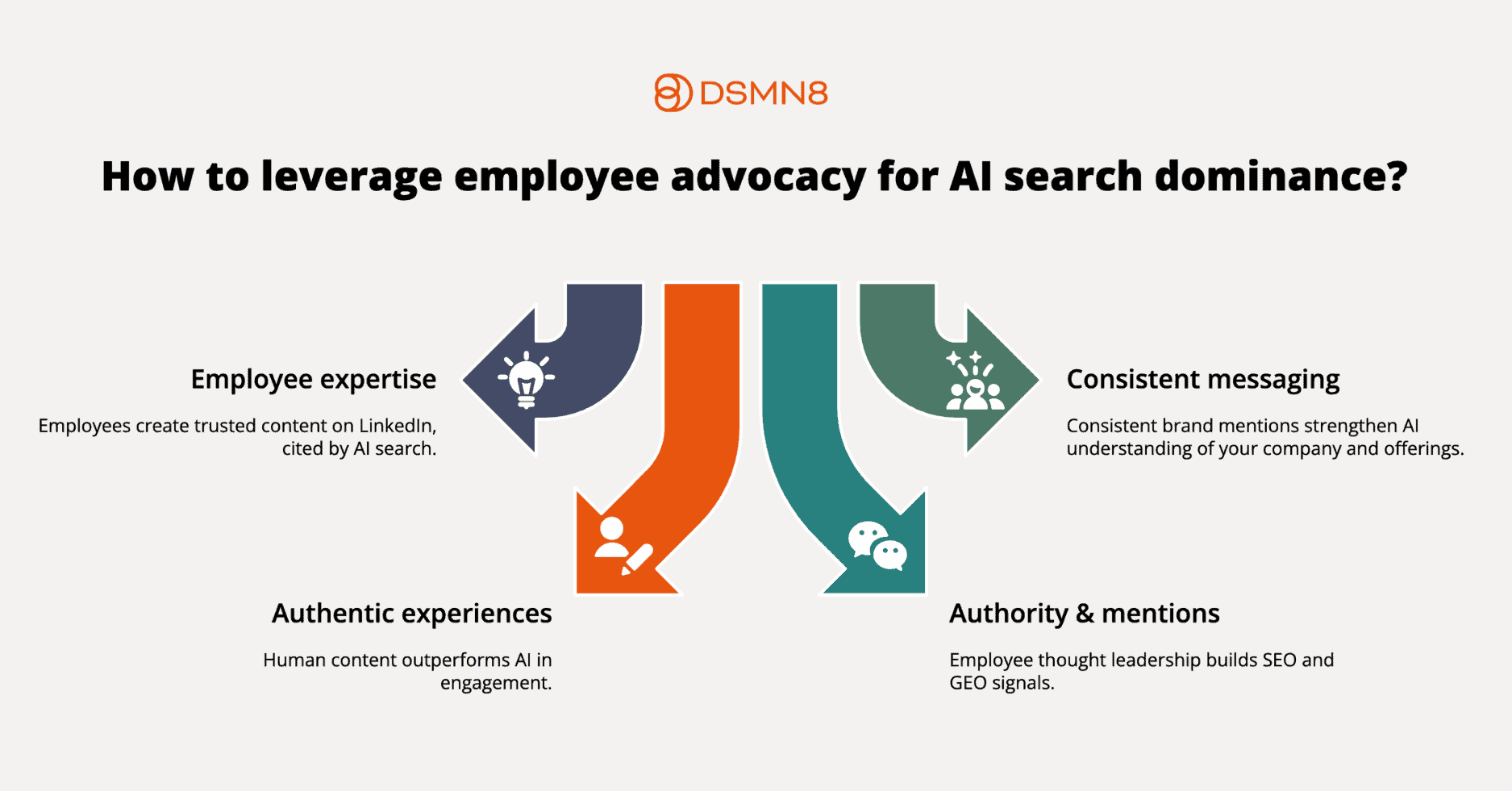
Here’s something you might not realize yet: your LinkedIn presence now influences whether your company shows up in AI-generated answers.
Tools like ChatGPT, Perplexity, and Google’s AI Overviews are increasingly pulling from LinkedIn when answering questions about people, companies, and industry topics. Profound research revealed that LinkedIn is now the #1 source for professional queries across LLMs.
A well-optimized profile, with a clear headline, keyword-rich summary, and regular content, gives AI engines more to work with when deciding whether to surface you or your company.
This matters beyond personal visibility. When your employees are active on LinkedIn, sharing company content and posting their own insights, that collective signal amplifies your brand’s presence in AI-generated results. It’s one of the reasons employee advocacy has become a core part of generative engine optimisation (GEO) strategy for forward-thinking B2B brands.
💡 Want to go deeper on this? Read our full breakdown: Employee Advocacy is Now an SEO and GEO Strategy.
7 Ways to Grow on LinkedIn
So now you’ve got an optimized LinkedIn profile, the next step is to grow!
But how?
Make sure to read our article all about how to write the perfect LinkedIn post, but for now, here’s a few tips to help:
- Break up the text. Use emojis and line-breaks. Make it easy to skim, because no-one wants to read a wall of words.
- Use relevant hashtags to increase your visibility.
- Spend the most time on your hook. Entice readers to click the ‘see more’ button!
- Create zero-click content, following the LinkedIn Link Preview Update.
1. Engage With Industry Thought Leaders
A good place to start is by following your industry thought leaders.
This not only gives you inspiration for your own LinkedIn content, but it’ll help you find a community of other people who work in your field.
Have a scroll through their posts – what resonates with you? What conversations are happening in the comments?
Don’t be a lurker: engage with their posts. Even if they don’t reply, other people will see your comments and you’ll make new connections.
The great thing about ensuring your profile is complete is that LinkedIn uses this information to serve you relevant content in your feed. This makes it easier to find industry conversations you can get involved in!
2. How To Write Good Comments on LinkedIn
It’s all about adding value.
Please don’t comment ‘great post’ or ‘agree’ on everything you see 😩
Ask questions, answer questions, share your insights.
That’s what it’s all about: professionals networking with each other, sharing resources and knowledge.
3. Connect With People
Please don’t randomly send connection requests to anyone and everyone. This is a sure-fire way to get banned from LinkedIn. And it’s super annoying 🙄
Aside from searching your industry keywords, joining groups is a great way to find likeminded folk to connect with. When you join a relevant group, engage with the community, get your name out there!
It might be tempting to connect with hundreds people at once if you’re new to LinkedIn, but keep in mind that you have a limit of 100 connection requests per week.
4. Be Active
According to Kinsta, only 1% of LinkedIn users share content on a weekly basis.
The opportunity to get your content seen is huge.
Posting every day is incredible, but don’t feel like you have to jump straight in. Try posting a couple of times a week, and you’ll see growth.
After posting, spend 15 to 30 mins engaging with other people on the platform. This will help get more engagement on your content. You’ve gotta give to receive!
Something to try:
Post at the same time every day. This will let people know when to expect a new post. Consistency is key!
Think about when your ideal audience is most active. During work hours? On their commute? Or in the evenings?
5. Don't Just Post Your Own Content
Being active is great, but don’t spam the timeline with your own stuff 24/7!
Try the 80/20 rule:
Aim for 80% educational, value-led content such as insights, tips, opinions, and industry commentary, then reserve around 20% for more promotional posts about your work or company.
This keeps your audience engaged without feeling like every post is a sales pitch.

6. Start a LinkedIn Newsletter
LinkedIn newsletters are one of the most underused growth tools on the platform.
Unlike regular posts, newsletters have a subscriber model: people opt in to receive your content directly, which means your reach isn’t dependent on the algorithm. Subscribers get notified every time you publish.
Top LinkedIn newsletters now have hundreds of thousands of subscribers. Even a modest, niche newsletter in your industry can build a highly engaged audience over time.
To get started, go to your profile, click “Write article”, then select “Create a newsletter”. Give it a name, a description, and a publication cadence you can actually stick to. Consistency matters more than frequency here.
The newsletter also appears in your Featured section automatically, giving it prime real estate on your profile.

8. Post Native Video
LinkedIn video is having a moment, and the algorithm is taking notice.
Native video uploads (i.e. video uploaded directly to LinkedIn, not linked from YouTube) see significantly higher reach than external links.
You don’t need a production setup. Talking directly to the camera on your phone, sharing a quick insight from your day, or walking through a slide or document on screen are all formats that perform well.
Key tips:
- Keep it under 60 seconds where possible
- Add captions – most LinkedIn users scroll with sound off
- Hook viewers in the first 3–5 seconds
- Upload natively rather than sharing a YouTube link
Know your score: LinkedIn’s Social Selling Index gives you a score based on how well you’ve built your profile, connected with the right people, engaged with insights, and built relationships.
It’s a useful baseline for tracking your progress, and a great way to identify where to focus next.
Additional Resources
You’ve learned all about how to set up your LinkedIn profile for success, optimize it for visibility, and how to grow on the platform.
Now you’re ready to make a splash on LinkedIn! 🌊
More LinkedIn Guides 👇
Wondering how active your team already is on social, and how you compare to your competitors?
Get a free competitor analysis review.
Ready to get started with the #1 employee advocacy platform?

Emily Neal
Emily is SEO Lead at DSMN8. She focuses on organic growth strategy across search and AI search and co-authors DSMN8's original research, including the Employee Advocacy Benchmark Report and edited CEO Bradley Keenan's book. Her background spans SEO strategy, technical web, long-form content, digital PR, and marketing automation.