Personal Voice AI adapts content to each employee’s natural voice.
The #1 Employee Advocacy Platform on G2
On-brand AI employee advocacy that sounds like you
DSMN8's Personal Voice AI adapts content so every LinkedIn share sounds like the employee who shares it, while maintaining key messaging.








Your Content, Their Voice, Maximum Impact
Most AI rewrites are generic and impersonal.
Personal Voice by DSMN8 transforms approved content into posts that feel personal, human, and impactful.
Why it matters
Efficient employee advocacy
One-click rewrites keep employee content on-brand while sounding like them.
Flexible control of AI content
Fine-tune style, tone, creativity, and language. No one-size-fits-all approach to AI.
Consistent messaging
Posts stay aligned with company values and key messaging while reflecting personal style.
How Personal Voice AI Works
1: Add Writing Samples. Automatically pull in LinkedIn posts or paste in your own samples from articles or social media content you’ve created.
2: Personal Voice AI analyzes your samples to identify your tone of voice and style.
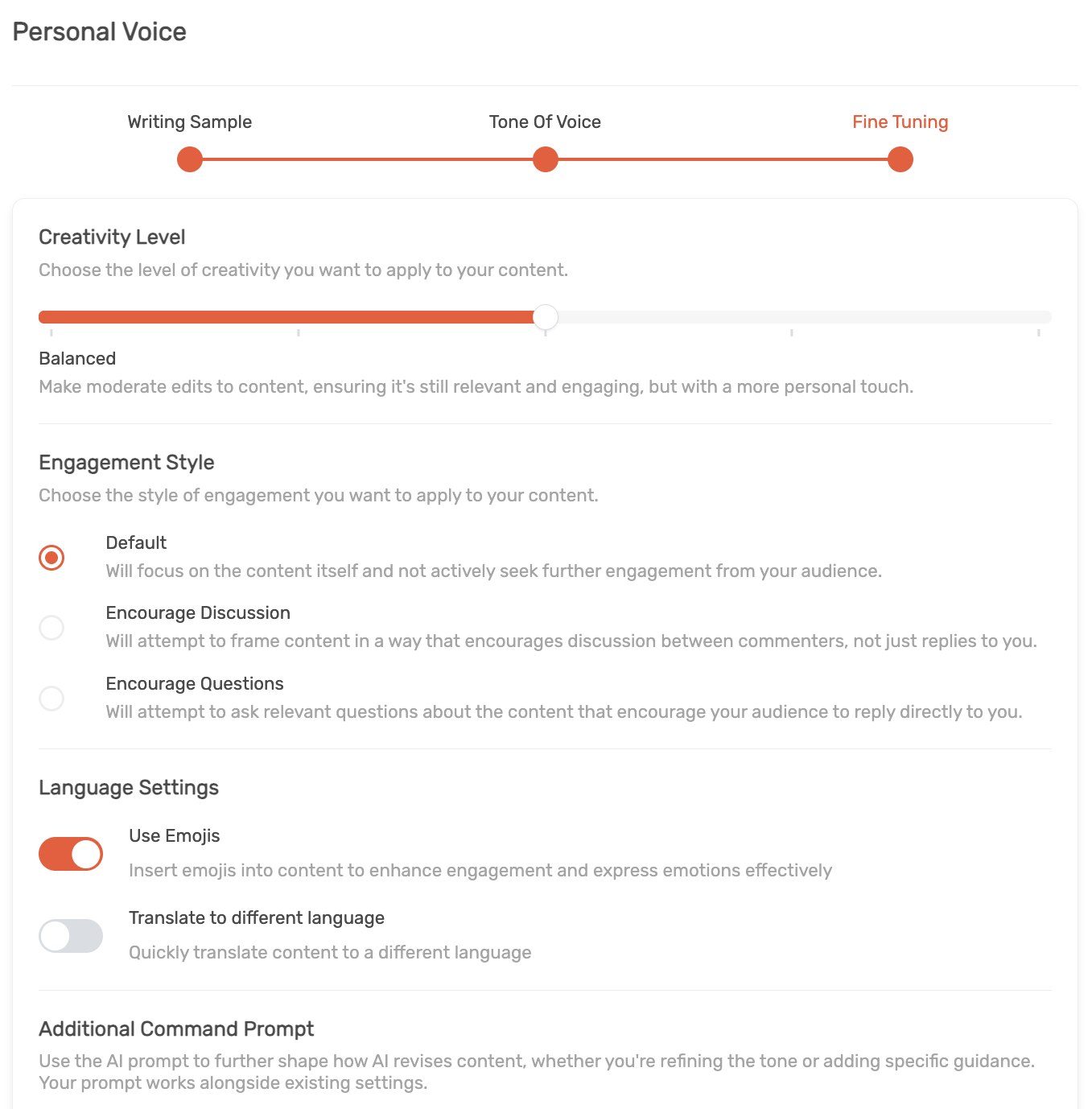
3: Fine Tuning. Control creativity, engagement style, language, and add optional custom prompts.
4: Apply and share. Turn any curated post into your personal voice in just one click.
Book a Demo
All the tools you need to make every post authentic
Authentic Voice
Posts reflect each employee’s natural style, not copy-paste.
Time-Saving
One-click rewrites makes sharing original posts effortless.
Customizable Tone
Fine-tune tone of voice, creativity level, and engagement style.
Inclusive & Compliant
Avoid restricted words, competitors, or sensitive phrasing.
Multilingual & Emoji Options
Adapt posts for language or style preferences. Translate content with ease.
Manage Executive Accounts
Manage senior leaders accounts with delegate access while maintaining their personal voice.
Engagement Optimization
Engagement settings for tailoring posts to spark discussion or inviting questions.
“Our C-Suite regularly receive feedback from industry peers saying – You guys own social. We see you everywhere! Which is a great validation of our employees’ efforts across social and the DSMN8 platform.”

What do you like best about DSMN8?
“I love using DSMN8 to automatically post content on LinkedIn, which helps us promote our company and products. It’s a very comprehensive platform. I particularly appreciate the ability to create content automatically.“
“DSMN8 makes it beyond easy for me to share posts to LinkedIn with just a click of a button! DSMN8 is also intuitive to use as I had no issues setting it up, posting, scheduling a post daily. Using DSMN8 daily helps me keep my LinkedIn active and relevant with company information.”
“As a user, this system gives me the security of being active in social media without taking risks. It is a platform aligned with our corporate policy that improves the position of the Company in social media, but also mine. Definitely, it is a win-win project!”


Try the #1 Employee Advocacy Platform
Bring personality to content, without losing control
Book a Demo
Join global enterprise teams using DSMN8's Personal Voice AI to ensure every LinkedIn post feels natural, engaging, and on-brand.
One-Click Rewrites
Scale Advocacy
Customizable AI
Frequently Asked Questions
What is Personal Voice in DSMN8?
Personal Voice lets employees personalize AI content so posts reflect their own tone, style, and personality. It adapts writing based on samples, selected tone presets, and custom prompts.
How do I set up Personal Voice in DSMN8?
Add writing samples from LinkedIn or other sources, fine-tune aspects such as creativity and engagement style, add custom prompts if desired, and test the sample outputs before saving. Users can edit or remove their Personal Voice at any time.
Do I have to provide writing samples?
No, but we strongly recommend it for the most accurate tone and style. However, you can skip this step and choose a preset tone instead.
Can I fine-tune how AI rewrites my content?
Yes. You can control creativity levels, engagement style (e.g., encouraging discussion), language settings (emojis, translation), and even add custom instructions for the AI.
How does Personal Voice work with content sharing?
Once set up, you can apply Personal Voice in one click when sharing curated posts in DSMN8. If needed, you can revert changes to go back to the original caption provided.
Can I change my Personal Voice after setup?
Yes. Users can edit settings, test sample outputs, or delete their Personal Voice at any time.
Does Personal Voice work with Delegate Access?
Yes. Once a Personal Voice is set up for an Executive Influencer, delegates can use it on the user’s behalf. This makes it easier than ever to manage an executive’s account!