Push relevant content to specific regions, departments, or business units, so employees only see what’s meant for them.
The #1 Employee Advocacy Platform on G2
Groups & Teams: The Right Content for the Right People
Structure your employee advocacy program around your business, and ensure every employee receives relevant content to share with their networks.




Say Goodbye to One-Size-Fits-All Employee Advocacy
When every employee shares the same content, relevance and engagement suffer.
DSMN8's Groups & Teams structure puts the right content in front of the right people.
Why it matters
Fuel friendly competition
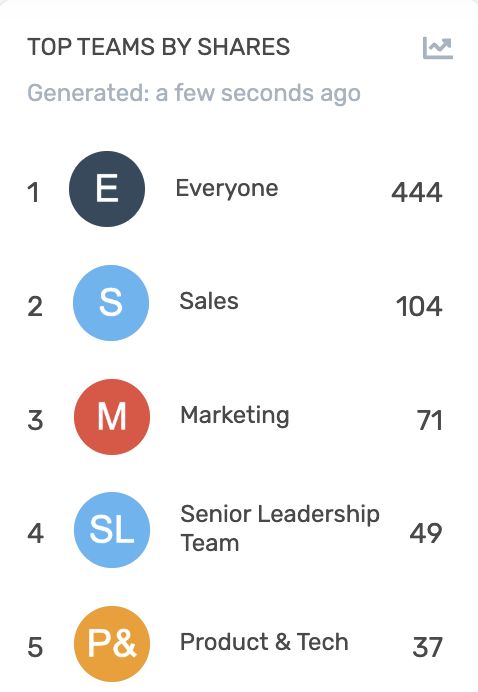
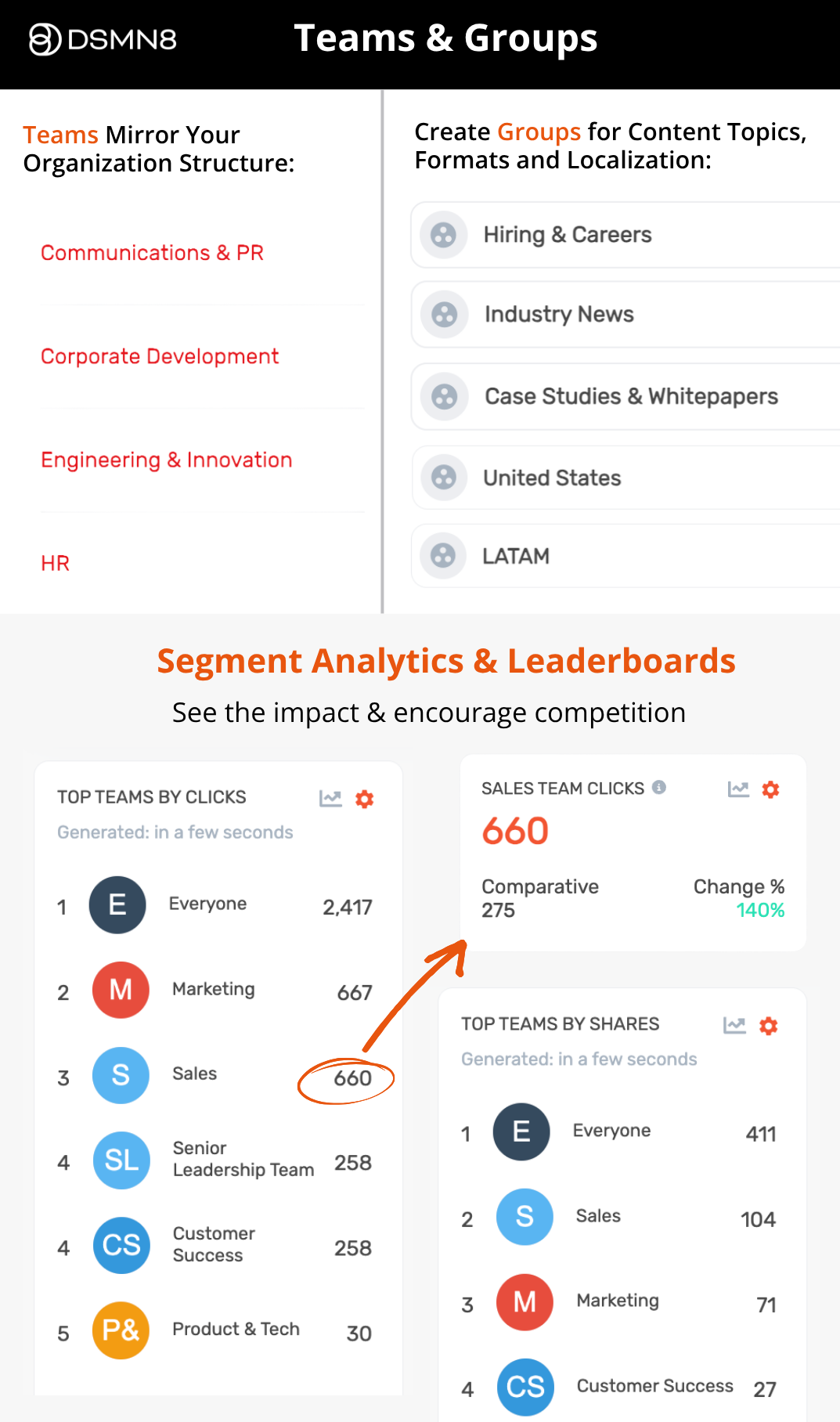
Team and cross-department leaderboards incite friendly competition. When employees can see how their team ranks, participation takes care of itself.
Gain clearer analytics
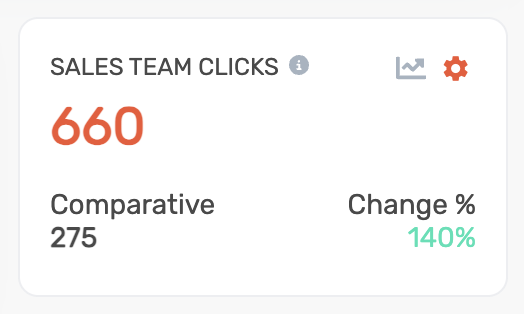
Segment your reporting by team to see exactly which groups are sharing the most and driving the highest engagement.
Protect exclusive communications
Restrict access to teams like Senior Leadership, ensuring only approved members can view and share exclusive content.
How Groups & Teams Work
1: Build Your Team Structure. Create teams that reflect your organizational structure — by region, department, or business unit.
2: Control Team Access. Restrict specific teams so only approved members can join. Optionally add domain-based permissions to automatically approve employees from a specific email domain.
3: Add Groups for Granular Segmentation. Groups sit beneath teams as a secondary layer of segmentation, letting you define custom groups for even more precise content targeting.
4: Make Groups Mandatory Where It Counts. For global content that every employee must see, set groups as mandatory so nothing important gets missed.
What DSMN8 Groups & Teams Unlocks for Your Organization
Content Targeting
Assign content to specific teams so employees only see what's relevant to their region, department, or business unit.
Restricted Team Access
Toggle on access controls per team. Keep sensitive teams like Senior Leadership visible only to approved members.
Domain-Based Auto-Approval
Automatically approve users into teams based on their email domain, reducing manual onboarding admin.
Custom Groups
Add groups beyond your core team structure for a secondary, more granular layer of segmentation.
Mandatory Groups
Make specific groups compulsory to ensure global content reaches every employee, every time.
Segmented Analytics
Break down performance reporting by team to understand which parts of your business are driving the most advocacy impact.
Team Leaderboards
Rank teams against each other and let the competition drive participation. Team and cross-department leaderboards give employees a reason to stay consistent.
“This initiative has given employees who didn’t have the know-how, the knowledge, confidence, and inspiration to become active social influencers.”

What do you like best about DSMN8?
“The ease of use for teams is exceptional, making it possible for multiple groups to gather the specific content they need for their own purposes.”
What do you like best about DSMN8?
“The platform allows for great interaction between marketing and other teams. It has all the essential features you’d expect, like scheduling posts and applying filters. The dashboard is a great bonus, tracking clear and useful information.”
“Employee shares on their personal social channels via DSMN8 has become one of the highest referrers of traffic to the AWIN site, securing employee advocacy as a core part of our marketing strategy. Seeing the results further motivates our teams to continue sharing company content.”


Try the #1 Employee Advocacy Platform
Ready to Get the Right Content to the Right People?
Book a Demo
Join global enterprise teams using DSMN8 to drive reach, engagement and ROI through employee-led social amplification.
Targeted Content
AI & Automation
Measurable Impact
Frequently Asked Questions
What's the difference between Teams and Groups in DSMN8?
Teams reflect your top-level business structure: regions, departments, or business units. Groups are a secondary layer of segmentation that sit beneath teams, enabling more granular content targeting and custom categorization.
How should I structure my Teams in DSMN8?
We recommend building your team structure around how you’d describe your business in the simplest terms. If your company operates by region, department, or business unit, those are your teams. Keep it clean and aligned to your org structure.
Can I restrict which employees can join a Team?
Yes. Each team can be individually restricted so that only approved members can access it. This is ideal for senior leadership or other groups requiring controlled visibility.
What are domain-based permissions?
If your employees use specific email domains, you can configure DSMN8 to automatically approve them into the relevant team — reducing manual admin and speeding up onboarding.
What is a Mandatory Group?
A mandatory group is one that users are automatically added to and cannot leave. It’s ideal for global content you need all employees to see and engage with.
How does segmentation affect my analytics?
With teams in place, you can break down analytics by team. This gives you visibility into which are most active, sharing the most content, and generating the highest engagement. This makes it easier to identify advocates, spot gaps, and optimize your program.
How secure is DSMN8?
Security is a top priority. DSMN8 supports enterprise-grade security such as Single Sign-On (SSO), ISO-27001 certification, and strict data protection standards. You can be confident that your brand and employee data are safe. Learn more about DSMN8’s security.
What tools does DSMN8 integrate with?
DSMN8 connects with tools like Slack, Salesforce, Microsoft Teams, Analytics platforms, and more. This makes it easy to keep advocacy aligned with your marketing and sales stack, while making adoption smooth for employees. Read more about our integrations.
What support does DSMN8 provide?
We don’t just hand you the software and walk away. From onboarding to strategy guidance, training resources, and templates, our customer success team is with you every step. Whether you’re new to advocacy or scaling globally, you’ll always have expert support.