Every asset, caption, and campaign in one place. Employees stop asking where to find things, and curators stop needing to answer. With notifications, newsletters, and integrations with your internal comms, there’s no excuse to share off-brand content.
The #1 Employee Advocacy Platform on G2
Every post your employees are approved to share, ready when they need it
DSMN8's Content Library: A Home for Your Employee Advocacy Program





Your Best Content Shouldn’t Be Buried Somewhere
Employees want to share. Don’t make it hard for them.
When your content lives across intranet folders, email threads, and Slack channels, employees give up looking or share old assets with outdated messaging. DSMN8 gives your program a single home, so employees instantly see approved shareable content.
Why it matters
Protect brand consistency
Everything in the library has been approved before it gets there. Design and comms teams know what is representing the brand.
Save your curators hours
Content flows in from the channels you already publish to, so building your library doesn’t need to be entirely manual. And because employee posts are shared through the DSMN8 platform, the impact is automatically measured in the analytics dashboard, including earned media value.
Show employees what applies to them
Each employee’s feed reflects the groups and teams they belong to. A US sales rep and a European engineer do not see identical content.
How DSMN8’s Content Library Works
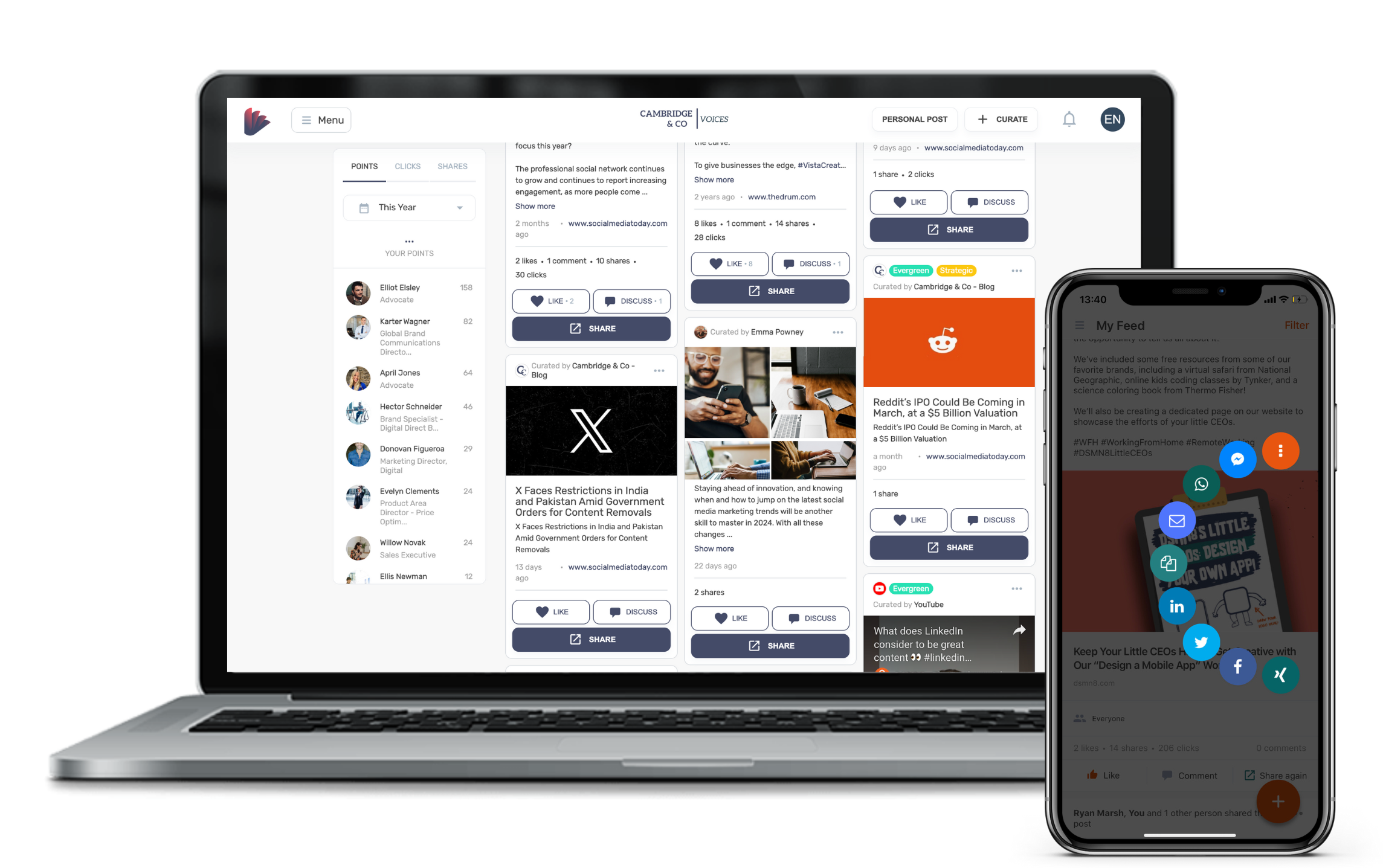
1: Fill the Library. Curators add content directly, and automated sources pull posts in from social channels, YouTube, and RSS feeds. Employees can suggest content too.
2: Approve and Organize. Set trusted sources to publish automatically, or hold content as pending for review. Add multiple captions or images to content, optionally tag to a campaign or event with an expiry date, then assign to the right groups and teams.
3: Employees Open Their Personal Feed. Each person sees a tailored library based on their group and teams. Strategic content sits at the top. Employees choose a tiled or list view, and can toggle hiding content they’ve already shared.
4: Share, Schedule, or Personalize. Employees share now, schedule for later, or refine the caption with Personal Voice AI before it goes out. Alternatively, use auto-scheduling for a hands-off approach.
What DSMN8’s Content Library Unlocks For Your Company
A Home for Social Assets
Video, carousels, images, links, and text posts in a single library. Employees stop searching Drive and Slack for something to post.
Automated Content Sources
Connect LinkedIn, Facebook, X, YouTube, and RSS feeds. Content you publish on company channels arrives automatically or ready to be curated.
Approval on Your Terms
Set trusted sources to publish automatically. Route everything else to a pending list your team can filter and approve.
Employee-Suggested Content
Employees submit content they think is worth sharing. It arrives in the same review queue, so the library grows without curators sourcing every piece themselves.
Groups and Teams Targeting
Segment content by region, department, or topic of interest. Each employee sees content suitable for them and their network.
Strategic Pinning
Mark high-priority content as 'Strategic' and it moves to the top of every relevant feed, so important company news does not sit behind evergreen posts.
Expiry Dates, Campaigns & Events
Set content to expire so nothing outdated gets shared. Group posts for specific campaigns or events to track performance in the analytics suite.
Notifications, Newsletters & Internal Comms
Your team won't forget to check the content library. They'll know when fresh content is available, through your comms channels, e.g. email, Slack/Teams, or in-app notifications.
“This initiative has given employees who didn’t have the know-how, the knowledge, confidence, and inspiration to become active social influencers.”

What do you like best about DSMN8?
“One of the biggest upsides is the company-provided content. I’ve had quite a bit of success posting this content on LinkedIn. The posts are vetted by my company and are 100% approved to share, which makes it easy to use them with confidence. I can also add my own comments on top of the posts, and that combination has worked well for me.”
What problems is DSMN8 solving and how is that benefiting you?
“DSMN8 makes my workflow much easier. I can see what content my colleagues are sharing, so I can create my own based on that or share existing content. Knowing it’s Akamai-approved, I know what I’m putting on LinkedIn is of value to my network.”
What do you like best about DSMN8?
“The user interface stands out to me, and I enjoy all the informative content being shared. The homepage and news feed are particularly awesome. The setup was easy, and I would give it a 10 in terms of user-friendliness.”


Join global teams using DSMN8 to get more of their employees sharing more consistently, with less effort from the team managing it.
AI & Automation
On-Brand Messaging
Measure the Impact
Frequently Asked Questions
What is a content library in employee advocacy?
A content library is the central place where an employee advocacy program stores everything employees are approved to share on social media. That includes video, carousels, images, link posts, and pre-written captions.
Instead of tracking content down across Drive folders, intranets, email, and Slack, employees open one feed and see what is available to them. For the marketing and communications teams running the program, the library is where content gets reviewed, organized, targeted to the right people, and retired once it is out of date.
Where does content in the DSMN8 Content Library come from?
Three places.
- Program curators add content directly.
- Automated sources pull it in from channels you already publish to, including LinkedIn, Facebook, X, YouTube, and RSS feeds.
- Employees themselves.
Anything arriving from an automated source or an employee suggestion can be set to publish straight to the library, or held in a pending list for a curator to approve first.
Can employees suggest content in DSMN8?
Yes. Employees submit content they have found or created, and it arrives in the pending list alongside automated sources. A curator reviews it before it reaches anyone else’s feed. This is different from Personal Posts, which are original employee-generated content for your own profile. Suggesting content is intended for curation, whether that’s for your team, region, or entire company.
Does every employee see the same content?
No. Each employee’s library is built from the groups and teams they belong to, which can be organized by region, department, or topic of interest. A curator can target a piece of content at a specific group, or make it available to everyone.
How do I stop outdated content from being shared through DSMN8?
Every piece of content can have an expiry date. You can also tag content to a campaign or event, which makes a timely set easier to find and manage together.
How do you get employees to actually use the content library?
The biggest barrier to any content library is employees forgetting to log in. DSMN8 sends in-platform and mobile app notifications when new content is available to them, bringing people back to share without a manual nudge from your team. You can also create internal newsletters to reach your team by email (with dynamic lists), and notify your team in your internal communications solutions like Slack or Teams.
Can you see whether employees are using DSMN8's content library?
User adoption is measurable by program admins: you can see who is sharing, what they’re sharing, and internal posts they’ve made in the platform. You can even target inactive users with dynamic email newsletters to give them a nudge.
How do you know if employee advocacy content is driving results?
Content library usage is only half of the picture when it comes to measuring impact. You’ll want to see the results that employee shares on social have driven, from impressions and engagement to website traffic and earned media value. DSMN8’s analytics suite automatically does this for you, so you can demonstrate the impact to leadership.
What tools does DSMN8 integrate with?
DSMN8 connects with tools like Slack, Salesforce, Microsoft Teams, Analytics platforms, and more. This makes it easy to keep advocacy aligned with your marketing and sales stack, while making adoption smooth for employees. Employees won’t forget your content library exists when they’re notified in channels they already use. Read more about our integrations.
What support does DSMN8 provide?
We don’t just hand you the software and walk away. From onboarding to strategy guidance, training resources, and templates, our customer success team is with you every step. Whether you’re new to advocacy or scaling globally, you’ll always have expert support.
Is DSMN8's security enterprise-ready?
Security is a top priority. DSMN8 supports enterprise-grade security such as Single Sign-On (SSO), ISO-27001 certification, and strict data protection standards. You can be confident that your brand and employee data are safe. Learn more about DSMN8’s security.